Showing posts with label Geek. Show all posts

Thursday, July 16, 2015

Open Source PDF Generation - Working example

wkhtmltopdf - An open source command line tool to convert HTML(s) to PDF, http://wkhtmltopdf.org/.
  1. Download the wkhtmltopdf from the website mentioned above. You should have these files downloaded from the website: wkhtmltopdf.exe, libeay32.dll, libgcc_s_dw2-1.dll, ssleay32.dll
  2. There is an extensive help available on the website. But in case if you want to explore options start with wkhtmltopdf.exe --extended-help
  3. The example below assumes generating pdf with 
    • 3 html files (Summary page - "SampleHTML.htm", Detailed page - "Totals.htm", Footer for every page - "Footer.htm")
    • 2 images (You can keep any png image and name it as logo1.png and logo2.png. These images will be used in Summary page, let's say, as company logo)
    • At the end of this step you should have 9 files: wkhtmltopdf.exe, libeay32.dll, libgcc_s_dw2-1.dll, ssleay32.dll, 2 images (logo1.png, logo2.png) and 3 html files ("SampleHTML.htm", "Totals.htm", "Footer.htm") in the same folder. Sample HTML and images can be downloaded here
  4. Now play around with the exe to generate the pdfs. Here are some sample commands. Run this in the command prompt. Change the directory in the command prompt to the directory where 9 files are stored and execute the below commands for pdf generation.
  • wkhtmltopdf.exe --margin-bottom 15mm --margin-left 20mm --margin-right 20mm  --footer-center "Page [page]" --footer-font-size 7  SampleHTML.htm Totals.htm SampleWithFooterPageNumbers.pdf
  • wkhtmltopdf.exe --margin-bottom 15mm --margin-left 20mm --margin-right 20mm  --footer-html footer.htm SampleHTML.htm Totals.htm SampleWithFooterAddress.pdf
  • wkhtmltopdf.exe --margin-bottom 15mm --margin-left 20mm --margin-right 20mm  --footer-html footer.htm SampleHTML.htm Totals.htm SampleWithFooterAddressAndPageNo.pdf

Monday, May 25, 2015

VS Web Performance / Load Test

You might get into the problem - Request failed: The remote name could not be resolved: '<>' when trying to work with VS (Visual Studio) web performance / load test. You might be wondering the URLs works perfectly fine while recording, however during the playback (Run Test) the same URLs are not working. The answer is - during recording, the browser proxy settings for firewall authentication can access URLs. However, during playback (Run Test) VS doesn't know the proxy settings. Solution is to let VS know on the proxy settings. 

Note that the proxy settings set for the webtest properties, as shown in the below screenshot, sometimes might not work (probably bug in the VS).


To overcome this there are two options. One is to attach the WebTestPlugin to the webtest OR attached the WebTestRequestPlugin for each URL in the recordings. Both the options are explained below

Option 1: WebTestPlugin

Create a class, inherited from WebTestPlugin as shown below.

using Microsoft.VisualStudio.TestTools.WebTesting;
using System.Net;

public class ProxyWeb : WebTestPlugin
{
    public override void PreRequest(object sender, PreRequestEventArgs e)
    {
        // Create a WebProxy object for your proxy
        WebProxy webProxy = new WebProxy(""); //Enter the proxy

        //Set the WebProxy so that even local addresses use the proxy
        // webProxy.BypassProxyOnLocal = false;

        // Use this WebProxy for the Web test
        e.WebTest.WebProxy = webProxy;


        e.WebTest.PreAuthenticate = true;
        NetworkCredential proxyCredentials;

        proxyCredentials = new NetworkCredential();

        proxyCredentials.Domain = ""; // Enter the domain
        proxyCredentials.UserName = ""; // Enter the user name
        proxyCredentials.Password = ""; // Enter the password
        e.WebTest.WebProxy.Credentials = proxyCredentials;
    }
}

Attach the plugin to the webtest as shown in the below screenshot


Option 2: WebTestRequestPlugin

Create a class, inherited from WebTestRequestPlugin as shown below.

using Microsoft.VisualStudio.TestTools.WebTesting;
using System.Net;

public class ProxyRequest : WebTestRequestPlugin
{
    public override void PreRequest(object sender, PreRequestEventArgs e)
    {
        // Create a WebProxy object for your proxy
        WebProxy webProxy = new WebProxy(""); // Enter the proxy

        //Set the WebProxy so that even local addresses use the proxy
        // webProxy.BypassProxyOnLocal = false;

        // Use this WebProxy for the Web test
        e.WebTest.WebProxy = webProxy;


        e.WebTest.PreAuthenticate = true;
        NetworkCredential proxyCredentials;

        proxyCredentials = new NetworkCredential();

        proxyCredentials.Domain = ""; // Enter the domain
        proxyCredentials.UserName = ""; // Enter the user name
        proxyCredentials.Password = ""; // Enter the password
        e.WebTest.WebProxy.Credentials = proxyCredentials;
    }
}

Attach the plugin to the each URL recorded in the webtest. i.e. Right click on the recorded URL and select "Add Request Plug-in".

For the most times option 1 should always work fine.

Wednesday, April 08, 2015

Web site vulnerability checklist

Some of the security vulnerability to be considered during web development.

  1. Cross-Site scripting: This means that a script can be sent and executed in a web request. A simple test to check this is write a sample javascript alsert script in the input control (ex: textbox) and see if in the postback the script is executed. Note that if the postback doesn't result in the alert message, then it doesn't mean the website is cross-side scripting safe. Google out for more possible script attacks.
  2. Privilege Escalation: Make sure the URL cannot be changed (ex: query string parameters) and the user is granted access to the resource that he/she is not intended to
  3. Clear-Text submission: This usually happens in non-secured sites. I.e. websites access via http protocol. Sensitive information (ex: passwords) are transferred as non-encrypted plain text. Where-ever possible either make the website as secured channel (https) or make sure the sensitive information is custom encrypted (client side) before passing over the network.
  4. Cacheable HTTPS response: This usually means the rendered code (the code you see in viewsource) is cached by the browser in temporary internet files folder; making it prone for hackers to scan the temporary internet files for any sensitive information. Check the response header for the attribute cache-control. This should ideally be set to no-cache.
  5. Autocomplete password: This mean the browser is capable of auto filling the password fields from the saved passwords. This is prone to attack, for hackers to steel the passwords from browsers. Set the autocomplete attribute of form tag to "off", to disable autocomplete on the complete web page or just on the password textbox, to disable autocomplete for just the password textbox
  6. Unsecure Cookies: Cookie information can be read by an injected script (ex: type the below javascipt in the browser url bar javascript:alert(document.cookie);). If this alerts the cookie information in the plain text, then the cookie for the website is not secured - prone to hack. Secure the cookie by using httponly flag.
  7. Web Server information leakage: Response headers has the information of web server in Server attribute. Revealing this information helps hackers to hack the system on the know security vulnerabilities. Remove the Server header information if found (http://blogs.msdn.com/b/varunm/archive/2013/04/23/remove-unwanted-http-response-headers.aspx)
  8. Click-jacking: This means that your webpage is rendered in the iframe of the hackers webpage. End users may not see this and may start filling the username and password - and you know the rest. To avoid a web page to be rendered as part of an iframe, use X-Frame response header attribute. Set the value of this attribute to DENY (to completely deny) / SAMEORIGIN (allow only in the same origin/website pages).

Tuesday, April 07, 2015

Browser Detection

Using the user agent to detect the browser type and version - I personally don't like this method, though used in majority of websites. Any new version of browser released to market, need to identify the uniqueness in the user agent that helps in identifying the browser. Additionally, MS IE user agent string is not unique when it works in compatibility and non-compatibility mode, making it much more complicated than other browsers.

 A better version is to make use of IIS component - MSWC and browscap.ini file. Internally, even this logic also make use of the user agent. However, these are tested, release candidates and hides all the internals from developers. Below are the steps to make use of this component in classic asp.
(Note that for other technologies, go to http://browscap.org/ website and download the xml or any other appropriate version of browscap file.)

  1. Get the latest version of browscap.ini file (ASP Version). Note that any new browser added to the market, this step should be repeated OR you can edit already downloaded file.
  2. Rename the file to browscap.ini and place the file in C:\Windows\System32\inetsrv folder. If 64 bit machine, then place it under C:\Windows\SysWOW64\inetsrv folder.
  3. Save the below code as asp file
<%
Set browser = Server.CreateObject("MSWC.BrowserType")

' some browser properties that can be accessed via BrowserType object. There are more - google.
browser=browserdetect.Browser
version=browserdetect.Version

' print some output
response.write ("browser: " & browser & "
")
response.write ("version: " & version & "
")
%>

That's it - access the asp file and you should see the output displaying browser type, version and other details. Isn't that simple and the code looks much simpler and neat.

Thursday, December 06, 2012

Oracle - Monitor Unused Objects

Unused Sequences

SELECT SEQUENCE_NAME, LAST_NUMBER FROM DBA_SEQUENCES WHERE SEQUENCE_OWNER = '[TableSpace Name]';
Run the SQL on a regular interval. Compare the LAST_NUMBER value with the previous run. If it has increased then the sequence is used else it is not.


Unused Idexes

Firstly, enable monitoring on Index using the script 
ALTER INDEX "' || i.owner || '"."' || i.index_name || '" MONITORING USAGE;

Note: Create a script which will run for all the indexes you want
Then, run the below script to see if the Indexes are used or not
SELECT segment_name, segment_type, bytes/1024/1024 meg, bytes/1024/1024/1024 gig
 FROM user_segments seg
 JOIN v$object_usage obj ON obj.index_name = seg.segment_name
WHERE used = 'NO';


Unused Tables
Use the auditing feature of Oracle to monitor the usage
1. Enable to auditing AUDIT INSERT ON [Table Name];
2. Audits are stored in USER_AUDIT_OBJECT table.
3. To turn off auditing use
NOAUDIT ALL ON [Table Name];
Tables With Statistics
Auditing on all the tables could be to find the unused tables is not required. If the stats exists for the table, then it means the table is being used. If the stats is not present or if the stats is too old, then those tables can be the candidates for unused tables. Monitor or Audit only these tables to find the unused tables.
SELECT A.*, B.CREATED
FROM (
    SELECT TABLE_NAME, MAX(LAST_STAT_TIME) LAST_STAT_TIME
     FROM (
        SELECT TABLE_NAME, MAX(TIMESTAMP) LAST_STAT_TIME
         FROM (
            SELECT DISTINCT B.TABLE_NAME
              FROM DBA_HIST_SQL_PLAN A JOIN DBA_INDEXES B ON B.INDEX_NAME = A.OBJECT_NAME
             WHERE OBJECT_OWNER = 'PD2' AND OBJECT_TYPE LIKE 'INDEX%' -- Indexes
            MINUS
             SELECT OBJECT_NAME TABLE_NAME
              FROM DBA_HIST_SQL_PLAN
             WHERE OBJECT_OWNER = 'PD2' AND OBJECT_TYPE LIKE 'TABLE%' --Tables
            )A
           JOIN DBA_HIST_SQL_PLAN B ON A.TABLE_NAME = B.OBJECT_NAME
          GROUP BY TABLE_NAME
        UNION
        SELECT OBJECT_NAME TABLE_NAME, MAX(TIMESTAMP) LAST_STAT_TIME
          FROM DBA_HIST_SQL_PLAN
         WHERE OBJECT_OWNER = 'PD2' AND OBJECT_TYPE LIKE 'TABLE%' --Tables
         GROUP BY OBJECT_NAME
        )
    GROUP BY TABLE_NAME
    )A
JOIN DBA_OBJECTS B ON A.TABLE_NAME = B.OBJECT_NAME AND B.OBJECT_TYPE = 'TABLE'
ORDER BY 1
Unused Procedures
Again, use the auditing feature of Oracle
AUDIT EXECUTE ON [Procedure] BY SESSION;

Auditing
/* *******************************************************************************************
 * Description: This script switch on the Audit for Procedures, Functions, Packages, Tables
 * ******************************************************************************************/
 
BEGIN
    FOR obj IN (SELECT DISTINCT(OBJECT_NAME) OBJECT_NAME, OBJECT_TYPE 
                  FROM DBA_OBJECTS
                 WHERE OWNER = 'PD2'
                   AND OBJECT_TYPE IN ('PACKAGE', 'PROCEDURE', 'FUNCTION', 'TABLE')
                   AND OBJECT_NAME NOT IN ('') -- Mention any objects to be excluded for auditing. For Ex: If we are finding unused object and if a objects is sure that it is used, then no need to audit those objects
               )
    LOOP
        BEGIN
            IF obj.OBJECT_TYPE = 'TABLE' THEN
                EXECUTE IMMEDIATE 'AUDIT INSERT, UPDATE, DELETE ON ' || obj.OBJECT_NAME;
            ELSE
                EXECUTE IMMEDIATE 'AUDIT EXECUTE ON ' || obj.OBJECT_NAME;
            END IF;
            DBMS_OUTPUT.PUT_LINE('Auditing On: ' || obj.OBJECT_NAME);
        EXCEPTION 
            WHEN OTHERS THEN 
                DBMS_OUTPUT.PUT_LINE('Error Auditing: ' || obj.OBJECT_NAME);
        END;
    END LOOP;
END;

/* **************************************************************************************
 * Description: This script switch off the Audit for Procedures, Functions, Packages, 
 *              Tables, Triggers, Views if it is found begin used
 *          Ex: If we are monitoring Unused objects, then use this scrit to disable 
 *              auditing once it is found that it is used
 * *************************************************************************************/
BEGIN
    FOR X IN (SELECT DISTINCT(OBJECT_NAME) OBJECT_NAME FROM DBA_OBJECTS
               WHERE OWNER = 'PD2'
                 AND OBJECT_TYPE IN ('PACKAGE', 'PROCEDURE', 'FUNCTION', 'TABLE')
              INTERSECT
              SELECT OBJ_NAME FROM USER_AUDIT_OBJECT)
    LOOP
        EXECUTE IMMEDIATE 'NOAUDIT ALL ON ' || X.OBJECT_NAME;
        DBMS_OUTPUT.PUT_LINE('Audit Off: ' || X.OBJECT_NAME);
    END LOOP;
END;

/* *******************************************************************************************
 * Description: Script to find unused objects
 * *******************************************************************************************/
SELECT OBJECT_NAME, OBJECT_TYPE 
  FROM DBA_OBJECTS WHERE OWNER = 'PD2'  
   AND OBJECT_TYPE IN ('PACKAGE', 'PROCEDURE', 'FUNCTION', 'TABLE')
   AND OBJECT_NAME NOT IN (SELECT OBJ_NAME FROM USER_AUDIT_OBJECT)

Wednesday, November 07, 2012

LINQ - String Concat


Came across a situation today where XML file has to be read, Search for all the occurrences of a element, Get the value of the searched element concatenated with comma separator. A simple, couple of lines, of code using LINQ does the trick. Here it is


string xml = File.ReadAllText("Input File Name");
XElement element = XElement.Parse(xml);

var soNumber = element.Descendants()
                        .Where(ele => ele.Name.LocalName.Contains("Element To Search For"))
                        .Select(ele => ele.Value)
                        .Distinct()
                        .Aggregate(new StringBuilder(), (current, next) => current.Append("'" + next + "',"));

Wednesday, October 10, 2012

Generic Data Object Class

Microsoft is deprecating OracleClient (System.Data.OracleClient) class from 4.0. Source - Click Here . Vendors are suppose to provide appropriate implementation. Vendor, in this case Oracle, has come up with the its own set of classes that can be plugged into .Net to access Oracle database - Oracle.DataAccess. Using Oracle.DataAccess has got lot of benefits including Bulk Copy/Updates. Ok, so what? Are we suppose to update the code base to use Oracle.DataAccess? I am sure, applications following design pattern will have a generic data access class that interacts with the database. i.e. any talk to database will happen via this class. So, does this make the job simple? Changing the generic class to use Oracle.DataAccess solves the problem? Yes, to some extent. However, imagine the case where the application need to interact with
1. Both Oracle and SQL OR
2. Support backward compatibility to make use of both System.Data.OracleClient and Oracle.Data.OracleClient

How do we achieve this?
Classes in System.Data.SqlClient, System.Data.OracleClient, Oracle.Data.OracleClient derives from common interface: IDbConnection, IDbCommand, IDbDataAdapter, IDbTransaction etc.

Something striking?
Factory Pattern - Create a generic class which return the interface instead of objects and use the interface to perform the database operations. Drop me a mail if you are interested in the Generic Data Object class.

Friday, October 05, 2012

Generic Request Authentication

Continuing with my last post on "Mixed mode authentication", that had a drawback of checking every .net page whether the request is authenticated or not, this post deals with the solution for it.

To check if the request is valid or not, we perform validations in every code behind file (i.e. if it is not authenticated, redirect to login or autologin page; if yes, process the request.). Imagine, if this has to be done on a existing applications - changing every code behind to verify the request is not only tiresome but repetitive task.

Here comes the .net request pipelines, HttpHandlers, for rescue. Idea is to create a custom HttpHandler (that validates every page request), hook this to the .Net application, provide the login/autologin url in web.config and that's it. No code change is required to validate the request anywhere else. It checks if the request is authenticated; if yes, returns the requested page handler; else, returns the autologin handler. Drop a mail if you are interested in the code.

Wednesday, July 13, 2011

Mixed mode authentication

There would be time when there would be requirement to automatically login to the application using Windows user credentials AND give an option for user to enter his credentials for login. Former one can be achieved by setting authentication mode to Windows and the later one can be achieved by setting authentication mode to Forms. However, since ASP .Net allows only one authentication mode to be set. There are different mechanisms to achieve this mixed mode, one that I feel is easy is by using the Context Session object. Leave a mail to get the sample of code @ praveen.balanagendra@gmail.com.

Thursday, May 06, 2010

Custom Tree Control

The default TreeView control provided by .Net framework
  • Doesn't have the capability to highlight which nodes are selected or not selected if all the nodes are collapsed. It takes to expand all the nodes to see which all are selected.
  • Though it provides feature to style LeafNode, ParentNode, SelectedNode etc; it doesn't have the capability to style individual/selected nodes
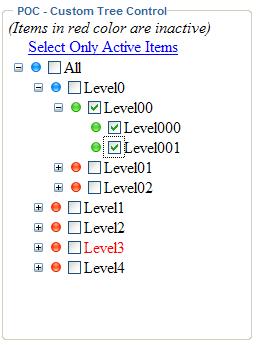
Custom Tree Control developed on top of the default TreeView control as shown below has the capability to perform the above mentioned features. Screenshot below.
Solution for point1 mentioned above
It highlights the node with green image if all the nodes under it is checked, with red image if none of its child nodes are checked, with blue image if some of the child nodes are checked
Solution for point2 mentioned above
Assuming that we want to highlight text of some nodes in red color [here it is to highlight inactive items. In this scenario all the items under node Level3 is assumed to be as inactive] we can achieve it.


Drop me a mail @ praveen.balanagendra@gmail.com for the source code.

Saturday, April 24, 2010

Retrieve FK constraints

Found the below query helpful

1. To get all the foreign key constraints defined in the database.

SELECT RC.CONSTRAINT_NAME
, RCU.TABLE_NAME REFERENCING_TABLE
, RCU.COLUMN_NAME REFERENCING_COLUMN
, RCU1.TABLE_NAME REFERENCED_TABLE
, RCU1.COLUMN_NAME REFERENCED_COLUMN
FROM INFORMATION_SCHEMA.REFERENTIAL_CONSTRAINTS RC
JOIN INFORMATION_SCHEMA.CONSTRAINT_COLUMN_USAGE RCU ON RC.CONSTRAINT_CATALOG = RCU.CONSTRAINT_CATALOG AND RC.CONSTRAINT_NAME = RCU.CONSTRAINT_NAME
JOIN INFORMATION_SCHEMA.CONSTRAINT_COLUMN_USAGE RCU1 ON RC.UNIQUE_CONSTRAINT_CATALOG = RCU1.CONSTRAINT_CATALOG AND RC.UNIQUE_CONSTRAINT_NAME = RCU1.CONSTRAINT_NAME

2. To get all primary keys defined in the database
SELECT T.TABLE_NAME, T.CONSTRAINT_NAME, K.COLUMN_NAME, K.ORDINAL_POSITION
FROM INFORMATION_SCHEMA.TABLE_CONSTRAINTS T
JOIN INFORMATION_SCHEMA.KEY_COLUMN_USAGE K ON T.CONSTRAINT_NAME = K.CONSTRAINT_NAME
WHERE T.CONSTRAINT_TYPE = 'PRIMARY KEY'
ORDER BY T.TABLE_NAME, K.ORDINAL_POSITION

Tuesday, April 06, 2010

Error while adding Web Reference in Visual Studio

Came through this strange error while updating web reference in VS 2005 - "The components required to enumerate web references are not installed on this computer. Please re-install Visual Studio".

Not sure on what was the reason for this. Luckily I didn't have to reinstall the VS. Use this command to reset the VS environment - C:\Program Files\Microsoft Visual Studio 9.0\Common7\IDE\devenv.exe /resetskippkgs. It seems as though VS was corrupted.

Tuesday, January 05, 2010

Update Panel causing full postback

For updatepanels to work on a normal ASP .Net web site; i.e. converting ASP .Net web site to ASP .Net AJAX enabled web site, make sure on the below things

web.config should be should have the following entries that tell asp.net how to use the ajax libraries (replace [ by < and ] by >)

[httpHandlers]
[remove verb="*" path="*.asmx"/]
[add verb="*" path="*.asmx" validate="false" type="System.Web.Script.Services.ScriptHandlerFactory, System.Web.Extensions, Version=1.0.61025.0, Culture=neutral, PublicKeyToken=31bf3856ad364e35"/]
[add verb="*" path="*_AppService.axd" validate="false" type="System.Web.Script.Services.ScriptHandlerFactory, System.Web.Extensions, Version=1.0.61025.0, Culture=neutral, PublicKeyToken=31bf3856ad364e35"/]
[add verb="GET,HEAD" path="ScriptResource.axd" type="System.Web.Handlers.ScriptResourceHandler, System.Web.Extensions, Version=1.0.61025.0, Culture=neutral, PublicKeyToken=31bf3856ad364e35" validate="false"/]
[/httpHandlers]
[httpModules]
[add name="ScriptModule" type="System.Web.Handlers.ScriptModule, System.Web.Extensions, Version=1.0.61025.0, Culture=neutral, PublicKeyToken=31bf3856ad364e35"/]
[/httpModules]

For most case the above entry in the we.config should make the web site as AJAX enabled web site. However when the web application is converted from 2003 to 2005, by default the conversion will include the xhtmlconformance element entry in the web.config and by default this will be set to Legacy. This is because .Net server controls until 2.0 framework by default doesn't emit XHTML compliant markup, hence to support backward compatibility xhtmlconformance will be set to Legacy. This setting has different rendering than .Net 2.0 rendering, which by default is XHTML compliant, and which makes updatepanels not to work in this mode. Set the xhtmlconformance to either Transitional OR Strict, will change the rendering mode and for updatepanels to work.

However, changing the conformance will cause the updatepanels to work, you might want to check all other pages in the web site, where DOM is referenced in the javascript, to see if it renders properly. Since because the rendering mode will change the client ids generated will also be different. So if this ID is used in the js, then you might want to change those as well.

Wednesday, December 02, 2009

SQL Server - Export to Excel directly

Was wondering if there is a way to directly export the sql query output in SQL SERVER to a Excel, instead of coding OR using SSIS/DTS package. Finally, got an answer in the link http://www.sqlteam.com/forums/topic.asp?TOPIC_ID=49926

Excerpt of the link
1. Create a procedure
create procedure proc_generate_excel_with_columns
(
@db_name varchar(100),
@table_name varchar(100),
@file_name varchar(100)
)
as

--Generate column names as a recordset
declare @columns varchar(8000), @sql varchar(8000), @data_file varchar(100)
select
@columns=coalesce(@columns+',','')+column_name+' as '+column_name
from
information_schema.columns
where
table_name=@table_name
select @columns=''''''+replace(replace(@columns,' as ',''''' as '),',',',''''')
print @columns
--Create a dummy file to have actual data
select @data_file=substring(@file_name,1,len(@file_name)-charindex('\',reverse(@file_name)))+'\data_file.xls'
print @data_file

--Generate column names in the passed EXCEL file
set @sql='exec master..xp_cmdshell ''bcp " select * from (select '+@columns+') as t" queryout "'+@file_name+'" -c -T'''
exec(@sql)

--Generate data in the dummy file
set @sql='exec master..xp_cmdshell ''bcp "select * from '+@db_name+'..'+@table_name+'" queryout "'+@data_file+'" -c -T'''
exec(@sql)

--Copy dummy file to passed EXCEL file
set @sql= 'exec master..xp_cmdshell ''type '+@data_file+' >> "'+@file_name+'"'''
exec(@sql)

--Delete dummy file
set @sql= 'exec master..xp_cmdshell ''del '+@data_file+''''
exec(@sql)

2. Execute the procedure
EXEC proc_generate_excel_with_columns 'your dbname', 'your table name','your file path'

Index Tuning

One of the thing that might come handy for performance tuning is Database index tuning. To find out how the index pages are fragmented use the below query, which will result in showing all the indexes which have the fragmentation of above 30%.

SELECT OBJECT_NAME(I.OBJECT_ID) AS TABLENAME
, I.NAME AS TABLEINDEXNAME
, PHYSTAT.AVG_FRAGMENTATION_IN_PERCENT
FROM SYS.DM_DB_INDEX_PHYSICAL_STATS(DB_ID('[[Database name]]'), NULL|OBJECT_ID('[[Table Name]]'), NULL, NULL, NULL) PHYSTAT
JOIN SYS.INDEXES I ON I.OBJECT_ID = PHYSTAT.OBJECT_ID AND I.INDEX_ID = PHYSTAT.INDEX_ID
WHERE PHYSTAT.AVG_FRAGMENTATION_IN_PERCENT > 30

Once we have the result, we can identify which index to tune up. i.e. either rebuild or reorganize. Below query can be used to rebuild the index

ALTER INDEX ALL ON [[Table name]] REBUILD

Thursday, August 27, 2009

Custom Hidden Variable

Was wondering if is there a alternate for using Hidden Variables. Finally IScriptControl, ICallbackEventHandler interface came to help in achieving a custom Hidden Control.

Using this one can set a Key, Value pair at client [which internally make use of CallBackEventHandler] or at server and access the value both at client and server side.

Mail me @ praveen.balanagendra@gmail.com for source code.

Wednesday, April 23, 2008

ClientScriptManager

ClientScriptManager, .Net 2.0 class which I found really cool and useful to make a callback without posting back the Web Page. Follow with the below example for understanding it.
Note: Replace [ by "<" and ] by ">"

Example:
1. Create a Web application application project and copy the below code to aspx page

[%@ Page Language="C#" AutoEventWireup="true" CodeBehind="Default.aspx.cs" Inherits="ClientScriptManagerExample._Default" %]

[html]
[head runat="server"]

[title]ClientScriptManager Example[/title]
[script type="text/javascript" language="javascript"]
function ReceiveServerData(result, context)
{
alert(result);
}
[/script]
[/head]
[body]
[form id="form1" runat="server"]
[asp:TextBox ID="txtInput" runat="server"][/asp:TextBox]
[asp:Button ID="btnClick" Text="Click" runat="server" OnClientClick="NoPostback(); return false;" /]
[div]

[/div]
[/form]
[/body]
[/html]
[script]
function NoPostback()
{
CallServer(document.getElementById('txtInput').value);
}
[/script]

2. Code Behind. Copy the following code

using System;
using System.Data;
using System.Configuration;
using System.Collections;
using System.Web;
using System.Web.UI;

namespace ClientScriptManagerExample
{
public partial class _Default : System.Web.UI.Page, ICallbackEventHandler
{
string strResult = "";

protected void Page_Load(object sender, EventArgs e)
{
ClientScriptManager csm = Page.ClientScript;
string strCallbackReference = csm.GetCallbackEventReference(this, "arg", "ReceiveServerData", "");

string strCallServer = "function CallServer(arg){" + strCallbackReference + " };";

csm.RegisterClientScriptBlock(this.GetType(), "CallServer", strCallServer, true);
}

public void RaiseCallbackEvent(string strInput)
{
strResult = "You typed: " + strInput;
}

public string GetCallbackResult()
{
return strResult;
}

}
}

3. Execute the application to see that it calls serverside function without having a postback

This is a simple program to demonstrate. One can extend this to use for anything.

Tuesday, March 07, 2006

Shutting down oracle jobs

This has been taken from the site http://www.databasejournal.com/features/oracle/article.php/10893_1580471_2

Viewing scheduled dbms_jobs

When looking at what jobs have been scheduled, there is really only one view that you need to go to. The dba_jobs view contains all of the information you need, to see what has been scheduled, when they were last run, and if they are currently running. Use the following simple script to take a look. Bear with me on the sub-select, I will build on this query as we go on in the presentation.

scheduled_dbms_jobs.sql

set linesize 250
col log_user for a10
col job for 9999999 head 'Job'
col broken for a1 head 'B'
col failures for 99 head "fail"
col last_date for a18 head 'Last|Date'
col this_date for a18 head 'This|Date'
col next_date for a18 head 'Next|Date'
col interval for 9999.000 head 'Run|Interval'
col what for a60

select j.log_user,
j.job,
j.broken,
j.failures,
j.last_date||':'||j.last_sec last_date,
j.this_date||':'||j.this_sec this_date,
j.next_date||':'||j.next_sec next_date,
j.next_date - j.last_date interval,
j.what
from (select dj.LOG_USER, dj.JOB, dj.BROKEN, dj.FAILURES,
dj.LAST_DATE, dj.LAST_SEC, dj.THIS_DATE, dj.THIS_SEC,
dj.NEXT_DATE, dj.NEXT_SEC, dj.INTERVAL, dj.WHAT
from dba_jobs dj) j;

What Jobs are Actually Running

A simple join to the dba_jobs_running view will give us a good handle on the scheduled jobs that are actually running at this time. This is done by a simple join through the job number. The new column of interest returned here is the sid which is the identifier of the process that is currently executing the job.

running_jobs.sql

set linesize 250
col sid for 9999 head 'Session|ID'
col log_user for a10
col job for 9999999 head 'Job'
col broken for a1 head 'B'
col failures for 99 head "fail"
col last_date for a18 head 'Last|Date'
col this_date for a18 head 'This|Date'
col next_date for a18 head 'Next|Date'
col interval for 9999.000 head 'Run|Interval'
col what for a60
select j.sid,
j.log_user,
j.job,
j.broken,
j.failures,
j.last_date||':'||j.last_sec last_date,
j.this_date||':'||j.this_sec this_date,
j.next_date||':'||j.next_sec next_date,
j.next_date - j.last_date interval,
j.what
from (select djr.SID,
dj.LOG_USER, dj.JOB, dj.BROKEN, dj.FAILURES,
dj.LAST_DATE, dj.LAST_SEC, dj.THIS_DATE, dj.THIS_SEC,
dj.NEXT_DATE, dj.NEXT_SEC, dj.INTERVAL, dj.WHAT
from dba_jobs dj, dba_jobs_running djr
where dj.job = djr.job ) j;

What Sessions are Running the Jobs

Now that we have determined which jobs are currently running, we need to find which Oracle session and operating system process is accessing them. This is done through first joining v$process to v$session by way of paddr and addr which is the address of the processs that owns the sessions, and then joining the results back to the jobs running through the sid value. The new columns returned in our query are spid which is the operating system process identifier and serial# which is the session serial number.

session_jobs.sql

set linesize 250
col sid for 9999 head 'Session|ID'
col spid head 'O/S|Process|ID'
col serial# for 9999999 head 'Session|Serial#'
col log_user for a10
col job for 9999999 head 'Job'
col broken for a1 head 'B'
col failures for 99 head "fail"
col last_date for a18 head 'Last|Date'
col this_date for a18 head 'This|Date'
col next_date for a18 head 'Next|Date'
col interval for 9999.000 head 'Run|Interval'
col what for a60
select j.sid,
s.spid,
s.serial#,
j.log_user,
j.job,
j.broken,
j.failures,
j.last_date||':'||j.last_sec last_date,
j.this_date||':'||j.this_sec this_date,
j.next_date||':'||j.next_sec next_date,
j.next_date - j.last_date interval,
j.what
from (select djr.SID,
dj.LOG_USER, dj.JOB, dj.BROKEN, dj.FAILURES,
dj.LAST_DATE, dj.LAST_SEC, dj.THIS_DATE, dj.THIS_SEC,
dj.NEXT_DATE, dj.NEXT_SEC, dj.INTERVAL, dj.WHAT
from dba_jobs dj, dba_jobs_running djr
where dj.job = djr.job ) j,
(select p.spid, s.sid, s.serial#
from v$process p, v$session s
where p.addr = s.paddr ) s
where j.sid = s.sid;

Now that we have a good handle on how we can look at the jobs and the key columns involved, let's go through the steps needed to bring down a job. The following is a 5 to 11 step process that should solve all of your problems.


Bringing Down a DBMS_JOB

1. Find the Job You Want to Bring Down
In order to do anything you first need to find the job that is giving you a headache. Go ahead and run the running_jobs.sql. This will give you the prime information, job, sid, serial#, and spid, for the following actions in bringing down the job.

2. Mark the DBMS_JOB as Broken
Use the following command for the job that you have to deal with.

SQL> EXEC DBMS_JOB.BROKEN(job#,TRUE);

All this command does is mark the job so that if we get it to stop, it won't start again. Let's make one thing perfectly clear, after executing this command the job is still running.

As a side note, if you are trying to shut down a database with jobs that run throughout the day, they may hinder your attempts to bring down the database cleanly. This is a wonderful command to make sure no jobs are executing during the shutdown process. Just be aware that you will need to mark the jobs as unbroken when the database comes back up, more on that later.

3. Kill the Oracle Session

Since the job is still running and it isn't going to end soon, you will need to kill the Oracle session that is executing the job. Use the following command for to kill the job.

ALTER SYSTEM KILL SESSION 'sid,serial#';
4. Kill the O/S Process

More often than not the previous step will still leave the job attached to the database and still running. When this happens you will need to go out to the operating system level and get rid of the process that has spawned from the running job. In order to do this you must login to the database box and issue the following command, depending on the type of operating system you have.

For Windows, at the DOS Prompt: orakill sid spid

For UNIX at the command line> kill '9 spid

The orakill is an Oracle command, while kill is a Unix command.

5. Check if the Job is Still Running

Re-run the session_jobs.sql script to see if you have gotten rid of the job. If you have there is no reason to go further. Usually steps 1 through 4 will be sufficient to get rid of a job but when the job is running wild you will have to continue with steps 6 through 11 which describes a process for bouncing the job queue process.

6. Determine the Current Number of Job Queue Processes

SQL> col value for a10
SQL> select name,value from v$parameter where name = 'job_queue_processes';

7. Alter the Job Queue to Zero

SQL> ALTER SYSTEM SET job_queue_processes = 0;

This will bring down the entire job queue processes.

8. Validate that No Processes are Using the Job Queue
Re-run the session_jobs.sql script to see if any jobs are still running. Since we have given a hard stop to the job queue and issued the kill commands, you can now wait until no more jobs are running. After all the jobs have quit running, you can do whatever maintenance or tuning you need to do before proceeding.

9. Mark the DBMS_JOB as Not Broken
You can now reset the broken job to not broken so they can run again. Just issue the command.

SQL>EXEC DBMS_JOB.BROKEN(job#,FALSE):

10. Alter the Job Queue to Original Value
Set the job queue to its' original value so that the jobs can run again.

ALTER SYSTEM SET job_queue_processes = original_value;

11. Validate that DBMS_JOB Is Running
To make sure everything is back to normal, re-run the above scripts to validate that jobs are scheduled, not broken, and are executing with the next and last dates columns changing.

Oracle have given us a great tool for scheduling activities within the database. As with many things inside the database, not everything goes as planned, nor are we given adequate tools to fix some of the problems we encounter. With the eleven steps outlined here, hopefully you will have increased your arsenal to handle those run away jobs that have given the best of us a few tense moments.

Sunday, June 12, 2005

Sending mails using network IIS server

Const cdoSendUsingPort = 25
Const strSmartHost = "{specify the smart host}"

'Create the message object.
Set objMessage = CreateObject("CDO.Message")

'Create the configuration object.
Set objConf = objMessage.Configuration

'Set the fields of the configuration object to send by using SMTP through port 25.
With objConf.Fields
.item("http://schemas.microsoft.com/cdo/configuration/sendusing") = cdoSendUsingPort
.item("http://schemas.microsoft.com/cdo/configuration/smtpserver") = strSmartHost
.Update
End With

'Set the To, From, Subject, and Body properties of the message.
With objMessage
.To = strTo
.From = strFrom
.Subject = strSubject
.TextBody = strBody
.Send
End With

set objMessage = Nothing